Note that I am logging to syslog rather than to a file (this won’t work on Windows). I think logging to syslog is better if you already have a scrapper running. And also, correlating with web-server logs is bit easier. Perhaps I am mistaken.
<?php

// app/Config/Services.php

use Bramus\Monolog\Formatter\ColoredLineFormatter;
use Monolog\Formatter\LineFormatter;
use Monolog\Handler\BrowserConsoleHandler;
use Monolog\Handler\StreamHandler;
use Monolog\Handler\SyslogHandler;
use Monolog\Logger;

class Services Extends BaseService
{
    // Other services are not shown.

    /**
     * Use monolog logger.
     *
     * - Logs to syslogs
     * - Logs to console (colored)
     * - Logs to browser console (development only).
     */
    public static function logger(bool $getShared = true): Logger
    {
        if ($getShared) {
            return static::getSharedInstance('logger');
        }

        $logger = new Logger('my-portal');
        $consoleHandler = new StreamHandler('php://stdout', \Monolog\Level::Info);
        $consoleHandler->setFormatter(new ColoredLineFormatter());
        $logger->pushHandler($consoleHandler);

        // Also log to syslog
        $facilityName = "local6"; // See list here https://en.wikipedia.org/wiki/Syslog#Facility_levels
        $sysLogHandler = new SyslogHandler('my-portal', $facilityName);
        $formatter = new LineFormatter("%channel%.%level_name%: %message% %extra%");
        $sysLogHandler->setFormatter($formatter);
        $logger->pushHandler($sysLogHandler);

        if(ENVIRONMENT === "development") {
            $logger->pushHandler(new BrowserConsoleHandler());
        }

        return $logger;
    }
}
Continue to use your log_message function as before, and perhaps comment out all but one handlers in app/Config/Logger.php file.
I think once service with alias logger is added, most handlers in file app/Config/Logger.php stops working by themselves.
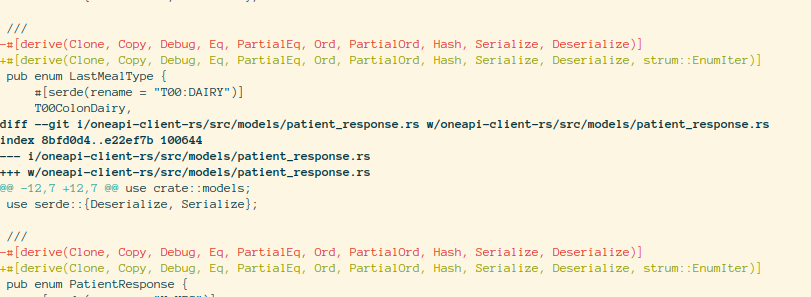
I needed to add more derive traits on the enum generated by openapi-generate-cli e.g. strum::EnumIter.
First, dump the templates using the following command openapi-generator-cli author template -g rust . This will write templates to the directory out.
Now edit the templates inside out directory. I had to add strum to Cargo.mutache and strum::EnumIter inside derive of all pub enum inside model.mustache file.
Now regenerate the client using openapi-generator-cli generate -t out -i openapi.json -g rust -o api-client-rs
And you have updated client.
Here are some diffs
PS: I could not get the local version to run on my system. I used the following docker command
There is also a QR scanner that may or may not work in your browser. I used a third party crate that I patched to compile with Leptos 0.7 but did not test is thoroughly.
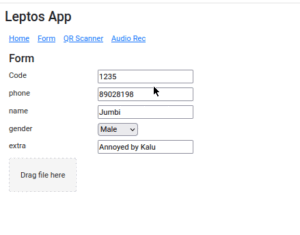
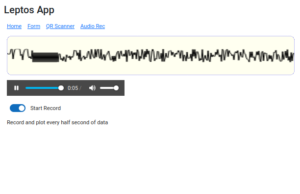
leptos-use (https://leptos-use.rs/) makes it easy to access browser’s API such a audio/video streams. The audio recorder records the audio in chunk of a few seconds and plot the raw values on the canvas. The plotting is very basic here!
I tried using https://thawui.vercel.app/ components but could not make it work with my slightly complicated hooks that update the local storage. I reverted back to standard leptos input component.
## [component]
pub fn Form() -> impl IntoView {
    let storage_key = RwSignal::new("".to_string());

    let (state, set_state, _) = use_local_storage::<KeyVal, JsonSerdeCodec>(storage_key);

    let upload_patient_consent_form = move |file_list: FileList| {
        let len = file_list.length();
        for i in 0..len {
            if let Some(file) = file_list.get(i) {
                tracing::info!("File to upload: {}", file.name());
            }
        }
    };

    view! {
        <h5>"Form"</h5>
        <Space vertical=true class=styles::ehr_list>

            // Everything starts with this key
            <ListItem label="Code".to_string()>
                <input bind:value=storage_key />
            </ListItem>

            // Patient
            <InputWithLabel key="phone".to_string() state set_state></InputWithLabel>
            <InputWithLabel key="name".to_string() state set_state></InputWithLabel>
            <SelectWithLabel
                key="gender".to_string()
                options=Gender::iter().map(|x| x.to_string()).collect()
                state
                set_state
            ></SelectWithLabel>
            <InputWithLabel key="extra".to_string() state set_state></InputWithLabel>

        </Space>
    }
}

## [derive(Debug, strum::EnumIter, strum::Display)]
enum Gender {
    Male,
    Female,
    Other,
}

## [component]
pub fn InputWithLabel(
    key: String,
    state: Signal<KeyVal>,
    set_state: WriteSignal<KeyVal>
) -> impl IntoView {
    let label = key.split("_").join(" ");
    let key1 = key.to_string();

    view! {
        <Flex>
            <Label>{label}</Label>
            // Could not get thaw::Input to change when value in parent changes.
            <input
                prop:value=move || {
                    state.get().0.get(&key1).map(|x| x.to_string()).unwrap_or_default()
                }
                on:input=move |e| {
                    set_state
                        .update(|s| {
                            s.0.insert(key.to_string(), event_target_value(&e));
                        })
                }
            />
        </Flex>
    }
}

// SelectWithLabel is not shown. See the linked repo for updated code.
If you are using internal IPs e.g. 192.168.0.300 etc for development, you are likely to encounter this error when dealing with media devices.
Assuming that you are not using localhost for development for a reason, you can do either of the following
In Firefox you can enable the following two options described in https://stackoverflow.com/a/66605018/1805129. Go to about:config
set to true media.devices.insecure.enabled and media.getusermedia.insecure.enabled
To make this problem concrete, I’ve downloaded database of all CVEs from https://github.com/CVEProject/cvelistV5 using git clone. I want to create API that can query this repository. I can think of the following available options.
Somehow ingest JSONs into a relational database and use SQL either using a third party tool or using a custom solution.
I’d have preferred 1 or 2 if I was writing a cli application. Since I am building a RESTful API, I’d prefer 3 since queries will be easier to write and integrate into other applications. Custom solution is also not a bad idea if existing tooling is not good enough or there are other constraints. Most databases like PostgreSQL and sqlite3 allows JSON to be inserted and queried.
For this exercise, I am not interested in performance. I can use caching to improve performance drastically later is need arise. I am looking for a solution that has the best DX — and if I am lucky doesn’t easily allow stupid mistakes!
Installation
The installation was a breeze. Single binary! It can also be used as Rust/Python library and third party integration for PHP are also available 💯.
$ wget https://github.com/duckdb/duckdb/releases/download/v1.1.3/duckdb_cli-linux-amd64.zip

$ unzip duckdb_cli-linux-amd64.zip
Archive:  duckdb_cli-linux-amd64.zip
  inflating: duckdb
(PY311) [dilawar@rasmalai cve_database_git (master)]$ ./duckdb
v1.1.3 19864453f7
Enter ".help" for usage hints.
Connected to a transient in-memory database.
Use ".open FILENAME" to reopen on a persistent database.
D
Great, seems to work!
Querying JSON files
For a sanity check, I did a “loopback” — print what you read. Just to make sure that engine is parsing JSON files. I passed a glob that matches all JSON files. Loading all files together raised an error — mismatch in schema.
D SELECT * FROM 'cves/**/*.json';
Invalid Input Error: JSON transform error in file "cves/2001/1xxx/CVE-2001-1517.json", in record/value 1: Object {"affected":[{"product":"n/a","vendor":"n/a","vers... has unknown key "tags"
Try increasing 'sample_size', reducing 'maximum_depth', specifying 'columns', 'format' or 'records' manually, setting 'ignore_errors' to true, or setting 'union_by_name' to true when reading multiple files with a different structure.
D
Fair enough warning about inconsistent schema across files and it suggested what I should explore. I like tools that hints at what to do in case of error💯.
I am not sure which one is the best option here though: ignore_errors or perhaps union_by_name is a better idea🤔? I am going ahead with union_by_name. I had to tweak the query little bit: SELECT * FROM read_json('cves/2000/**/*.json', union_by_name = true);
Nice!
Note that we are not yet inserting these JSON record into to a SQL table but rather processing them on the fly. I say this because I don’t see the opened database test.duck.db size to increase at all!
To insert these JSON records into SQL table that can be queries later, we use the following
D CREATE TABLE cve AS SELECT * FROM read_json_auto('./cves/2003/*/*.json', union_by_name = true);
100% ▕████████████████████████████████████████████████████████████▏
D select COUNT(*) FROM cve;
┌──────────────┐
│ count_star() │
│    int64     │
├──────────────┤
│         1553 │
└──────────────┘
I am ready to append to this table and write queries.
Using python module
I did the same exercise as before using duckdb python module.
 import duckdb

 git_repo = _cve_repo_dir()
 logger.info(f"Syching duckdb from {git_repo}...")
 json_files = list(git_repo.glob("cves/*/**/*.json"))

 con = duckdb.connect("cve.duck.db")

 \# create table if it doesn't exists using a JSON.
 first_json = json_files[-1]
 logger.info(f"> Creating table using {first_json}")
 con.sql(
    f"CREATE TABLE IF NOT EXISTS cves AS SELECT * FROM read_json('{str(first_json)}', union_by_name = True)"
 )
 s = con.sql("SELECT * FROM cves;")
 print(s)
Great, once I have table initialized with schema, I can insert entries from other files: INSERT INTO cves SELECT * FROM read_json('{str(file)}'). One has to ensure that other files have same schema. If not, then we get error while inserting.
TypeMismatchException: Mismatch Type Error: Type STRUCT(cveId VARCHAR, assignerOrgId UUID, state VARCHAR, dateReserved VARCHAR, dateUpdated
VARCHAR, dateRejected VARCHAR, assignerShortName VARCHAR) does not match with STRUCT(cveId VARCHAR, assignerOrgId UUID, state VARCHAR,
assignerShortName VARCHAR, dateReserved VARCHAR, datePublished VARCHAR, dateUpdated VARCHAR). Cannot cast STRUCTs - element "dateRejected" in
source struct was not found in target struct
But I just couldn’t figure out how to the resolve the following error. Looks like updating an existing table to support the schema of a new file is not supported out of the box.
TypeMismatchException: Mismatch Type Error: Type STRUCT(defaultStatus VARCHAR, platforms VARCHAR[], product VARCHAR, vendor VARCHAR, versions
STRUCT(lessThan VARCHAR, status VARCHAR, "version" VARCHAR, versionType VARCHAR)[]) does not match with STRUCT(collectionURL VARCHAR,
defaultStatus VARCHAR, packageName VARCHAR, product VARCHAR, versions STRUCT(lessThanOrEqual VARCHAR, status VARCHAR, "version" VARCHAR,
versionType VARCHAR)[], vendor VARCHAR). Cannot cast STRUCTs of different size
The solution to this problem in this case was simple. Each sub-directory contains files with the same schema. I created a table for each sub-directory!
2.7GB worth of CVEs were stored in 456MB of database file.
[dilawar@khaja keeda-py (download_cve_database)]$ du -sh cve_json_db.git/cves/
2.7G    cve_json_db.git/cves/
[dilawar@khaja keeda-py (download_cve_database)]$ ls -ltrh cve.duck.db
-rw-r--r-- 1 dilawar dilawar 456M Nov 30 20:56 cve.duck.db
[dilawar@khaja keeda-py (download_cve_database)]$
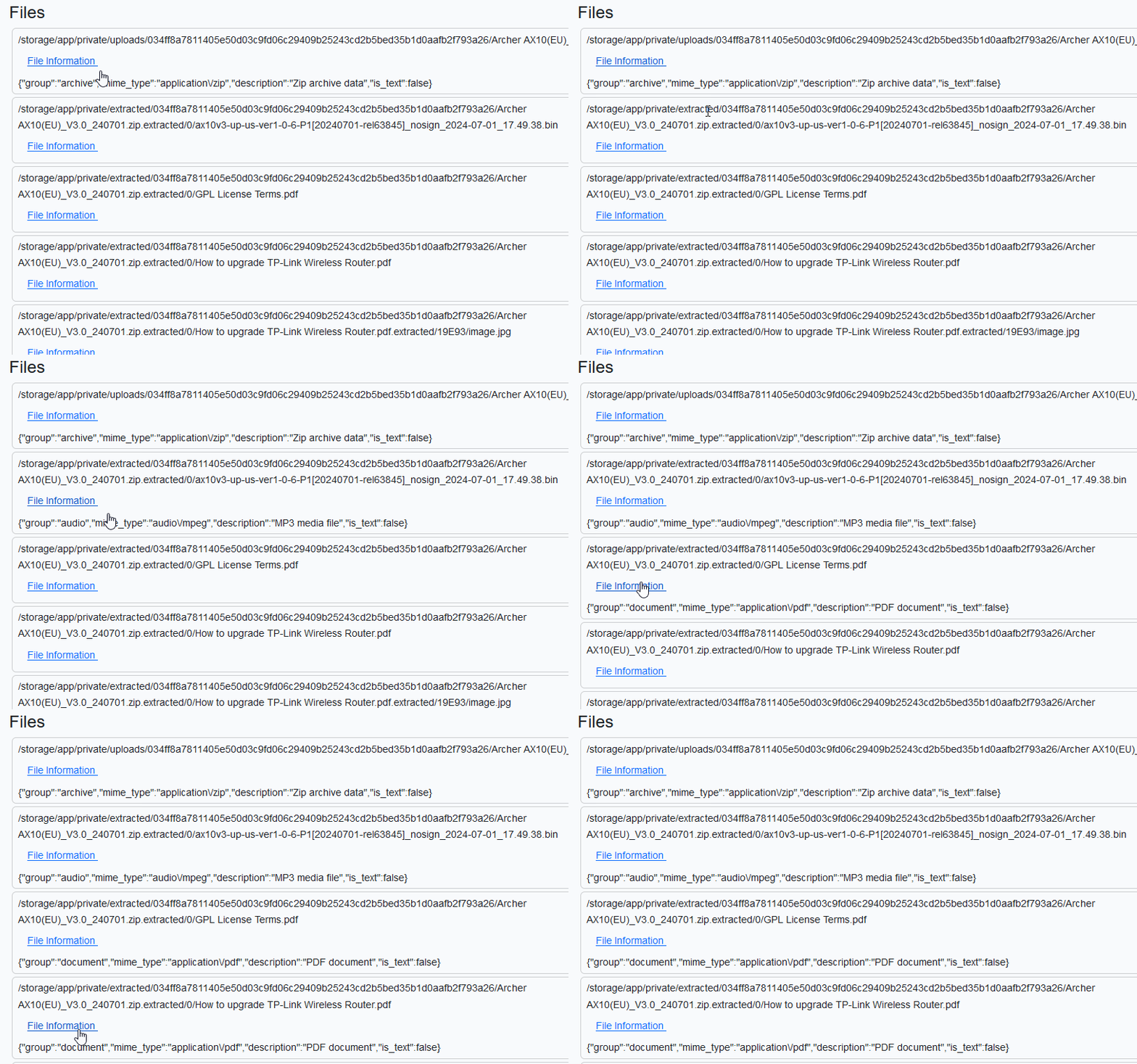
I’ve a list of uploaded files that I plan to render in a view. For each file, I want to call an API endpoint e.g. /api/v1/fileinfo to fetch some information and display it.
My blade template is following. A sample HTML page generated from it is shown above.
Being old school, I don’t want to enable livewire/inertia just for this. I thought of of using AJAX which all the cool kids were using a decade ago.
Enter AJAX HTMX
Recently I read about HTMX. It is a good opportunity to play with it. The HTMX documentation (</> htmx ~ Documentation) is superb. The API looks great. AJAX can wait.
In code sample shown below, htmx-post define the endpoint that will be called with data defined in hx-vals when hx-trigger event occurs. The inner img with class htmx-indicator will get triggered and we’ll see a indicator spinning for a short while. The value received from server will be put into hx-target which has id $id. $id is generated randomly by PHP to create one-to-one mapping between hx-target and target div.
        @foreach ($files as $file)
            <div class="card m-1 px-2 py-1">
                <!-- Generate a unique id to insert content received from POST
                    request -->
                @php($id=uniqid("div_"))
                <div class="card-content">
                    {{ $file['display_name'] }}
                </div>
                <div>
                    <button class="btn btn-link"
                        hx-post="/api/v1/fileinfo"
                        hx-vals='{"path" : "{{ $file["path"] }}" }'
                        hx-target='#{{ $id }}'
                        hx-trigger="mouseenter"
                        >
                        File Information
                        <img class="bg-primary htmx-indicator" src="{{ asset('svg/90-ring.svg') }}" />
                    </button>
                    <div id="{{ $id }}">
                    </div>
                </div>
            </div>
        @endforeach
Let’s see this in action. We barely see the spinner since the request doesn’t take much time.
Importantly, note that we render raw JSON😢. HTMX expects HTML from servers and doesn’t support JSON → HTML conversion natively. Well, this sucks for obvious reasons. Who returns HTML from APIs?!
The top-level div has hx-ext set that enables the extension.
hx-target is replaced by mustache-template.
👉🏾 Our <template> is added. If you are using blade then you have to prefix mustache template with @ so that blade doesn’t touch them. The template create HTML out of JSON.
Let’s try again! Great, I got most basic functionalities working.
I have somethat that may look like the output of tree like command. I want it a plain list wihtout nesting for further processing. I want to convert the following on the left to the one on the right.
Line 12 converts HashMap to a vector of vector where inner most vector is join of key with individual values. flatten converts vector of vector to a vector (akin to concat).
Today, I wanted to look inside the firmware before uploading it to the router. I downloaded and unzipped it. It’s a pretty big file for a firmware. Inside the zip, there was a .bin
file. The venerable file utility told me it that it is a hex file.
“`
[dilawar@rasmalai keeda-rs (main)]$ file ax10v3-up-us-ver1-0-6-P1\[20240701-rel63845\]_nosign_2024-07-01_17.49.38.bin
../ax10v3-up-us-ver1-0-6-P1[20240701-rel63845]_nosign_2024-07-01_17.49.38.bin: data
“`
The all-mighty magika is much-much better but still not very helpful.
“`bash
$ magika ax10v3-up-us-ver1-0-6-P1\[20240701-rel63845\]_nosign_2024-07-01_17.49.38.bin
ax10v3-up-us-ver1-0-6-P1[20240701-rel63845]_nosign_2024-07-01_17.49.38.bin: ISO 9660 CD-ROM filesystem data (archive)
“`
Then, I played with hexdump but not with much success. Too much tribal knowledge and bravery is needed to use hexdump or similar tool. What would a coward do?
I searched around a bit and found exactly was I was looking for. This blog post Steak’s DocsReverse Engineering TP-Link TL-WA901ND firmware and obtainin…. explains exactly what I was looking for. Great! Just use binwalk. And binwalk has been rewritten in Rust! 🦀. Double great!
I asked it to extract the file using `binwalk -e`. It extracted two UBI Image files.
“`bash
[dilawar@rasmalai 034ff8a7811405e50d03c9fd06c29409b25243cd2b5bed35b1d0aafb2f793a26]$ binwalk -e ax10v3-up-us-ver1-0-6-P1\[20240701-rel63845\]_nosign_2024-07-01_17.49.38.bin
/home/dilawar/.keeda/data/034ff8a7811405e50d03c9fd06c29409b25243cd2b5bed35b1d0aafb2f793a26/extractions/ax10v3-up-us-ver1-0-6-P1[20240701-rel63845]_nosign_2024-07-01_17.49.38.bin
——————————————————————————————————————————————————————————–
DECIMAL HEXADECIMAL DESCRIPTION
——————————————————————————————————————————————————————————–
4825 0x12D9 UBI image, version: 1, image size: 23330816 bytes
——————————————————————————————————————————————————————————–
[+] Extraction of ubi data at offset 0x12D9 completed successfully
——————————————————————————————————————————————————————————–
Analyzed 1 file for 85 file signatures (187 magic patterns) in 120.0 milliseconds
“`
“`bash
[dilawar@rasmalai ubi_12D9.img]$ ls -la
total 21824
drwxr-xr-x 2 dilawar users 84 Nov 17 07:42 .
drwxr-xr-x 3 dilawar users 26 Nov 17 07:42 ..
-rw-r–r– 1 dilawar users 3936256 Nov 17 07:42 img-1957174073_vol-kernel.ubifs
-rw-r–r– 1 dilawar users 18411520 Nov 17 07:42 img-1957174073_vol-rootfs.ubifs
“`
Now can I extract what is inside UBI file? Sure I can. I wish there was a recursive extract option in binwalk. Use `binwalk -Mve` to recursively extract files. It’s super cool!
“`bash
[dilawar@rasmalai img-1957174073_vol-kernel.ubifs.extracted]$ cd 0/
[dilawar@rasmalai 0]$ ls -ltrha
total 3.7M
drwxr-xr-x 3 dilawar users 15 Nov 17 07:46 ..
-rw-r–r– 1 dilawar users 3.7M Nov 17 07:46 Linux-4.4.140.bin
drwxr-xr-x 2 dilawar users 31 Nov 17 07:46 .
“`
### Gotchas! Missing helper tools
`binwalk` depends on other tools to do its bidding e.g., `dtc` and `vmlinux-to-elf`
(vmlinux-to-elf). You must ensure these are installed. Run the following
Also install dtc. It’s not available on Debian. You have to manually install it. It is available on multiple other OSes though https://pkgs.org/search/?q=dtc&on=provides.
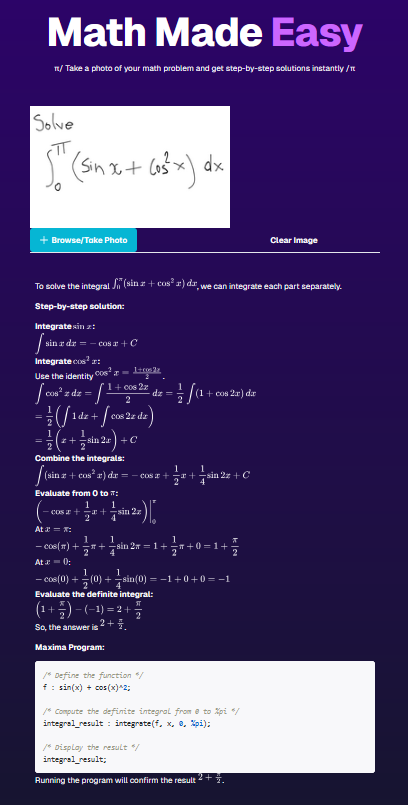
Last week, I spend some time learning react framework. I did a small project where you can upload screenshot of your math problem and get step-by-step solution using OpenAI. The project was not my own idea.
I used NextJS, Typescript and tRPC for this project — this stack was suggested. In the past, I have used JavaScript but do not have great understanding of it. I am yet to read a decent book such a https://eloquentjavascript.net/.
React was totally new to me. Though I am familiar with underlying concepts or reacting programming since I’ve used Vue before. I have no opinion about nextjs, it is popular among React people so I just used it. I still don’t know how I feel about React. The Vue documentation is certainly better than React/NextJS.
https://trpc.io/ is certainly very interesting and I see its appeal. tRPC has the benefit of using the same language for both server and client side. At the time of writing his blog post, it didn’t have good support for uploading form-data (the form-data API is in beta which I didn’t try). Laravel + PHP8 is my go to stack for backend but I guess it is not popular with cool kids. PHP5 has a well deserved bad reputation which is no longer true for PHP8 but bad reputations are not easily lost.
The dependency management with npm is worse than Python’s ecosystem. I hope it gets better. Rust ecosystem and cargo has spoiled me so bad and sometimes I feel like why do I even bother with any other language!
Here is screenshot of the app. You’d need OpenAI key to run this app.
For last 3 months, my Zoho Mail client lost an essential features: desktop notification when a calendar event is about to occur. It sends in-app notification but it is useless since I don’t pay attention to that. Calendar notifications are much more important since most of them are social contracts and one must not mixed them with mere notification. I missed many meetings or got late by a few minutes. A developer easily lose track of time when working!
I wrote to Zoho support and they told me that they are reimplementing it a brand new feature that will enable this again. Note to product manager — don’t break a working feature unless the implementation is ready. And they claimed they have enabled the desktop notification just for me. To this day, I am yet to see a desktop notification from Zoho Email client. I double, triple check the settings and after 10 years of experience with software development, I can’t figure is how to enable this settings, this tool is not for me!
Given calendar iCal url, it sends you desktop notification if an event is about to occur. At the time of this writing, “about to occur” means in 3 minutes. You can tweak this and perhaps send me a PR if you make it configurable from the cli.
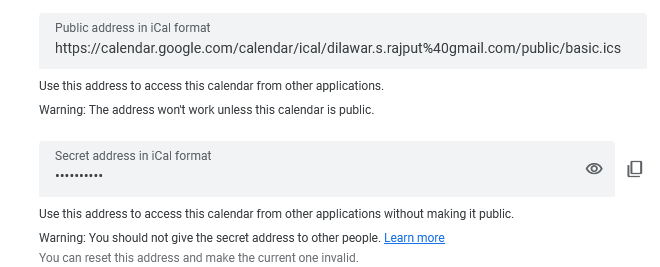
How to find an iCal url? Most calendar providers should have it enabled in settings. Here is a screenshot from google calendar.
You should use the private URL if you also want to see the title of the event.
 https://serveo.net/