Tag Archives: tips

Changing client generated by openapi-generated-cli tool by modifying templates

I needed to add more derive traits on the enum generated by openapi-generate-cli e.g. strum::EnumIter.

  • First, dump the templates using the following command openapi-generator-cli author template -g rust . This will write templates to the directory out.
  • Now edit the templates inside out directory. I had to add strum to Cargo.mutache and strum::EnumIter inside derive of all pub enum inside model.mustache file.
  • Now regenerate the client using openapi-generator-cli generate -t out -i openapi.json -g rust -o api-client-rs

And you have updated client.

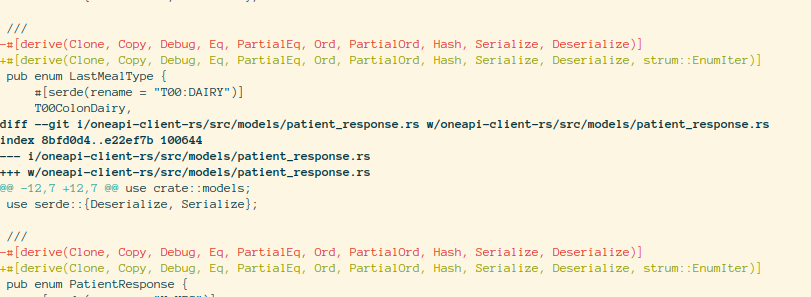
Here are some diffs

86d3b88c268545798a7cf5a917a99052 -- Screenshot of code

PS: I could not get the local version to run on my system. I used the following docker command

    podman run --rm \
        -v $PWD:/local openapitools/openapi-generator-cli generate \
        -i https://beta.oneapi.dognosis.link/api/v1/openapi.json \
        -t /local/templates \
        -g rust \
        -o /local/oneapi-client-rs

vue: navigator.mediaDevices is undefined

If you are using internal IPs e.g. 192.168.0.300 etc for development, you are likely to encounter this error when dealing with media devices.

Assuming that you are not using localhost for development for a reason, you can do either of the following

  1. In Firefox you can enable the following two options described in https://stackoverflow.com/a/66605018/1805129. Go to about:config
    set to true media.devices.insecure.enabled and media.getusermedia.insecure.enabled

90c8821922ca484ba9ad755c39c9adbe -- <code>about:config</code> options in firefox” title=”” class=”aligncenter” /></a></p>
<ol>
<li>You can use service like <code>ngrok</code> or https://serveo.net/ to temporarily get https address. I learnt about these two services in the README file of https://www.npmjs.com/package/vue-qrcode-reader.</li>
</ol>
					</div><!-- .entry-content -->
		
		<footer class= This entry was posted in Notes and tagged , , , , , on by .

Using $\sout{\text{AJAX}}$ HTMX with Laravel + Blade

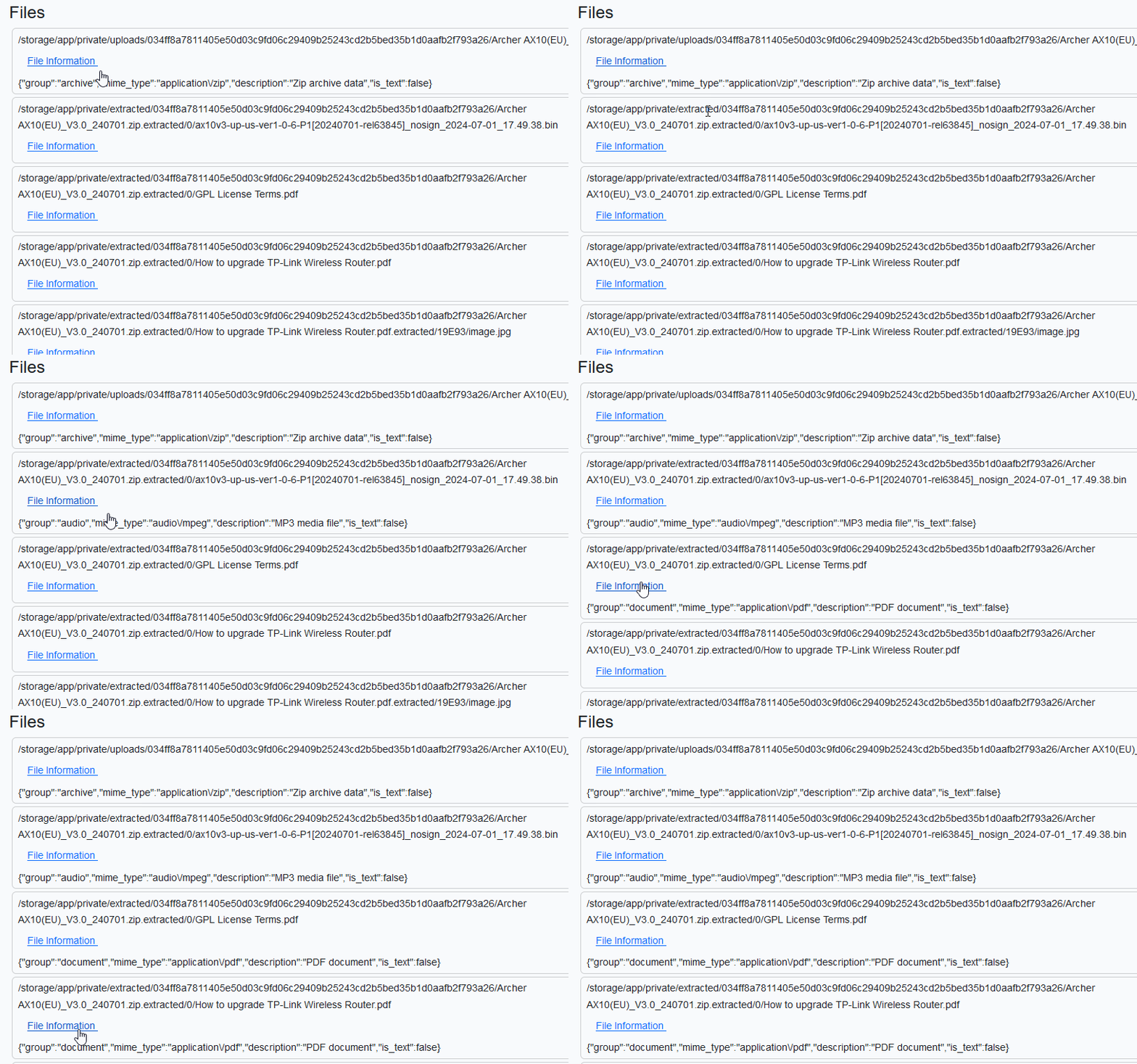
I’ve a list of uploaded files that I plan to render in a view. For each file, I want to call an API endpoint e.g. /api/v1/fileinfo to fetch some information and display it.

c7056b55f49a4c00aa56b6a26fe19f5e -- List of files in blade template

My blade template is following. A sample HTML page generated from it is shown above.

@extends('layouts.app')                                                                                                                 

@section('content')                                                                                                                     
    <div class="container">                                                                                                             
        <h3>Files</h3>                                                                                                                  

        @foreach ($files as $file)                                                                                                      
            <div class="card m-1 px-2 py-1">                                                                                            
                <div class="card-content">                                                                                              
                    {{ $file['display_name'] }}                                                                                         
                </div>                                                                                                                  
                <div>                                                                                                                   
                    <button class="btn btn-secondary">Show Information</button>                                                         
                </div>                                                                                                                  
            </div>                                                                                                                      
        @endforeach                                                                                                                     

    </div>                                                                                                                              
@endsection

Being old school, I don’t want to enable livewire/inertia just for this. I thought of of using AJAX which all the cool kids were using a decade ago.

Enter AJAX HTMX

Recently I read about HTMX. It is a good opportunity to play with it. The HTMX documentation (</> htmx ~ Documentation) is superb. The API looks great. AJAX can wait.

In code sample shown below, htmx-post define the endpoint that will be called with data defined in hx-vals when hx-trigger event occurs. The inner img with class htmx-indicator will get triggered and we’ll see a indicator spinning for a short while. The value received from server will be put into hx-target which has id $id. $id is generated randomly by PHP to create one-to-one mapping between hx-target and target div.

        @foreach ($files as $file)                                                                                                          
            <div class="card m-1 px-2 py-1">                                                                                                
                <!-- Generate a unique id to insert content received from POST                                                          
                    request -->                                                                                                             
                @php($id=uniqid("div_"))                                                                                                    
                <div class="card-content">                                                                                                  
                    {{ $file['display_name'] }}                                                                                             
                </div>                                                                                                                      
                <div>                                                                                                                       
                    <button class="btn btn-link"                                                                                            
                        hx-post="/api/v1/fileinfo"                                                                                          
                        hx-vals='{"path" : "{{ $file["path"] }}" }'                                                                         
                        hx-target='#{{ $id }}'                                                                                              
                        hx-trigger="mouseenter"                                                                                             
                        >                                                                                                                   
                        File Information                                                                                                    
                        <img class="bg-primary htmx-indicator" src="{{ asset('svg/90-ring.svg') }}" />                                      
                    </button>                                                                                                               
                    <div id="{{ $id }}">                                                                                                    
                    </div>                                                                                                                  
                </div>                                                                                                                      
            </div>                                                                                                                          
        @endforeach

Let’s see this in action. We barely see the spinner since the request doesn’t take much time.

00694da521964fe6b9c9edaf99485ca7 -- HTMX in Laravel Blade

Importantly, note that we render raw JSON😢. HTMX expects HTML from servers and doesn’t support JSON → HTML conversion natively. Well, this sucks for obvious reasons. Who returns HTML from APIs?!

So we have to turn JSON into HTML by ourselves. Thankfully there are community maintained plugins such as client-side-templates. See https://github.com/bigskysoftware/htmx-extensions/blob/main/src/client-side-templates/README.md. The plugin documentation is pretty clear. I am going to show the final solution.

  • The top-level div has hx-ext set that enables the extension.
  • hx-target is replaced by mustache-template.
  • 👉🏾 Our <template> is added. If you are using blade then you have to prefix mustache template with @ so that blade doesn’t touch them. The template create HTML out of JSON.
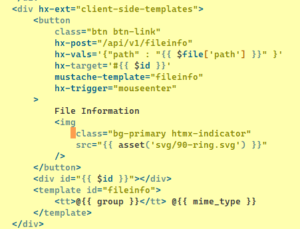
04c2c39271db4853b35822b149e30634 -- Code Snippet showing how to use htmx

Let’s try again! Great, I got most basic functionalities working.

05047d703e9b446d823bc8e4bff79096 -- Demo: HTMX with blade template

Apparently HTMX is quite powerful. You can search HN for resources https://hn.algolia.com/?q=htmx

Display git branches sorted by activity

Many times I have to check the branch I touched most recently. git-extras didn’t have a useful command to list the branches sorted by activity. I search around and found the following script that works perfectly.

## !/bin/sh

set -ex

git branch \
    -va \
    --sort=-committerdate \
    --format='%(committerdate:short) %(refname:short)'

The most updated version can be found here https://raw.githubusercontent.com/dilawar/Scripts/master/git_branch_sorted_by_activity.sh.

Storing environment variables for CICD pipelines

Instead of storing environment variables in Gitlab, we encrypt the .env file using gpg and commit the encrypted file to the repository. Let’s say that we used key stored in environment variable KEY , encrypting is easy gpg -c .env. It will prompt for passphrase and create an encrypted file .env.gpg.

To decrypt in the pipeline,

gpg --yes --batch --passphrase-file <(echo $KEY) -d ./.env.gpg  > .env

I am usually nervous talking about security since there are many ways things can go wrong. But here is my take on the pros of this approach.

  • The environment remains part of the code and can be changed easily by the developer.
  • You can run the pipelines locally as well without downloading many environment variables and files from Gitlab.
  • It will be easy to migrate to a bit more secure setup e.g. using password vaults and their cli.

Cons

  • One secret to rule them all! Keep it secure please.

Some Vim Tips

  • Select previous visual block gv.
  • Profiling vim plugins or who is making my vim less-awesome

    Thanks https://stackoverflow.com/a/12216578/1805129

    :profile start profile.log
    :profile func *
    :profile file *
    " At this point do slow actions
    :profile pause
    :noautocmd qall!
    
  • Using As difftool
    • Once you are done with the merge, run :wqa to save all the windows and quit. If you want to abandon the merge instead, run :cq to abort all changes and return an error code to the shell. This will signal to Git that it should ignore your changes.
  • Diffget can also accept a range. If you want to pull in all changes from one of the top windows rather than working chunk by chunk, just run :1,$+1diffget {LOCAL,BASE,REMOTE}. The +1 is required because there can be deleted lines “below” the last line of a buffer.
  • The “patience” algorithm often produces more human-readable output than the default, “myers.” Set it in your .vimrc like so:
    if has("patch-8.1.0360")
        set diffopt+=internal,algorithm:patience
    endif
    
  • Going back in time: There’s always [u]ndo or you can use :earlier 2mto go back 2 minutes in time

  • Profiling who is making you vim slow:

    How to see which plugins are making Vim slow?

  • Search and replace everywhere:

    • :%s/foo/bar/g.
    • Replace the word under cursor everywhere in the buffer/file.

    Just use * and then:

    :%s//new value/


    If you don’t specify a pattern, the substitute command uses the last searched one.
    Depending on the value of gdefault in your configuration, you might need to add a /g modifier to that command.

    In Vim, replace all occurrences of current term under cursor

Rust

Using zypper inside Dockerfile in non-interactive mode (without user prompts)

zypper is not the most container-friendly package manager out there. There is a --non-interactive global option that silences the prompts and assumes suitable defaults, but it doesn’t always work, for example, when you add a repository and import the keys. See more here

How to use zypper in bash scripts for someone coming from apt-get?

Following works for me and I use this pattern in all of my openSUSE based containers.

FROM opensuse/leap:15.4

RUN zypper --non-interactive --quiet addrepo --refresh  \
    https://download.opensuse.org/repositories/devel:languages:rust/15.4/devel:languages:rust.repo
RUN zypper --non-interactive --gpg-auto-import-keys refresh
RUN zypper --non-interactive install \
    --allow-vendor-change \
    osc obs-service-cargo_vendor obs-service-recompress obs-service-tar_scm \
    && zypper clean --all

This is based on the following answer.

How to use zypper in bash scripts for someone coming from apt-get?