
Tag Archives: open-source

A simple `leptos` app

rust-projects/leptos at main · dilawar/rust-projects
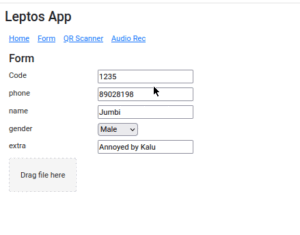
3691284a54cc44739171c1cf66b10e3c -- A simple app using Rust + Leptos. A form that stores data to LocalStorage. Its reactive!

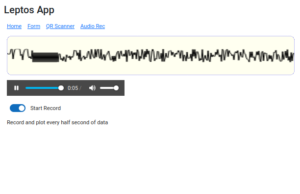
cbeb303e4778433c9071bdec36216919 -- Audio recording in a Rust + Leptos app

There is also a QR scanner that may or may not work in your browser. I used a third party crate that I patched to compile with Leptos 0.7 but did not test is thoroughly.

leptos-use (https://leptos-use.rs/) makes it easy to access browser’s API such a audio/video streams. The audio recorder records the audio in chunk of a few seconds and plot the raw values on the canvas. The plotting is very basic here!

I tried using https://thawui.vercel.app/ components but could not make it work with my slightly complicated hooks that update the local storage. I reverted back to standard leptos input component.

## [component]
pub fn Form() -> impl IntoView {
    let storage_key = RwSignal::new("".to_string());

    let (state, set_state, _) = use_local_storage::<KeyVal, JsonSerdeCodec>(storage_key);

    let upload_patient_consent_form = move |file_list: FileList| {
        let len = file_list.length();
        for i in 0..len {
            if let Some(file) = file_list.get(i) {
                tracing::info!("File to upload: {}", file.name());
            }
        }
    };

    view! {
        <h5>"Form"</h5>
        <Space vertical=true class=styles::ehr_list>

            // Everything starts with this key
            <ListItem label="Code".to_string()>
                <input bind:value=storage_key />
            </ListItem>

            // Patient
            <InputWithLabel key="phone".to_string() state set_state></InputWithLabel>
            <InputWithLabel key="name".to_string() state set_state></InputWithLabel>
            <SelectWithLabel
                key="gender".to_string()
                options=Gender::iter().map(|x| x.to_string()).collect()
                state
                set_state
            ></SelectWithLabel>
            <InputWithLabel key="extra".to_string() state set_state></InputWithLabel>

        </Space>
    }
}

## [derive(Debug, strum::EnumIter, strum::Display)]
enum Gender {
    Male,
    Female,
    Other,
}

## [component]
pub fn InputWithLabel(
    key: String,
    state: Signal<KeyVal>,
    set_state: WriteSignal<KeyVal>
) -> impl IntoView {
    let label = key.split("_").join(" ");
    let key1 = key.to_string();

    view! {
        <Flex>
            <Label>{label}</Label>
            // Could not get thaw::Input to change when value in parent changes.
            <input
                prop:value=move || {
                    state.get().0.get(&key1).map(|x| x.to_string()).unwrap_or_default()
                }
                on:input=move |e| {
                    set_state
                        .update(|s| {
                            s.0.insert(key.to_string(), event_target_value(&e));
                        })
                }
            />
        </Flex>
    }
}

// SelectWithLabel is not shown. See the linked repo for updated code.
A math tutor using NextJs/tRPC and OpenAI

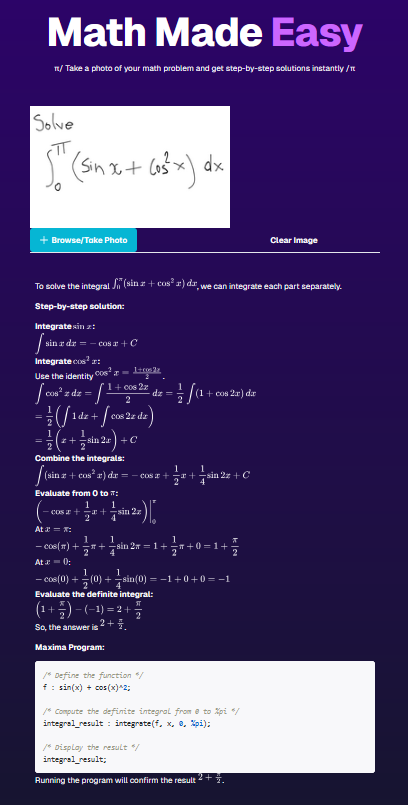
Last week, I spend some time learning react framework. I did a small project where you can upload screenshot of your math problem and get step-by-step solution using OpenAI. The project was not my own idea.

https://github.com/dilawar/math-tutor-openai

I used NextJS, Typescript and tRPC for this project — this stack was suggested. In the past, I have used JavaScript but do not have great understanding of it. I am yet to read a decent book such a https://eloquentjavascript.net/.

React was totally new to me. Though I am familiar with underlying concepts or reacting programming since I’ve used Vue before. I have no opinion about nextjs, it is popular among React people so I just used it. I still don’t know how I feel about React. The Vue documentation is certainly better than React/NextJS.

https://trpc.io/ is certainly very interesting and I see its appeal. tRPC has the benefit of using the same language for both server and client side. At the time of writing his blog post, it didn’t have good support for uploading form-data (the form-data API is in beta which I didn’t try). Laravel + PHP8 is my go to stack for backend but I guess it is not popular with cool kids. PHP5 has a well deserved bad reputation which is no longer true for PHP8 but bad reputations are not easily lost.

The dependency management with npm is worse than Python’s ecosystem. I hope it gets better. Rust ecosystem and cargo has spoiled me so bad and sometimes I feel like why do I even bother with any other language!

Here is screenshot of the app. You’d need OpenAI key to run this app.

math-tutor-openai -- A simple typescript math tutor app

A simple tool to send desktop notification for a calendar event

First the rant!

For last 3 months, my Zoho Mail client lost an essential features: desktop notification when a calendar event is about to occur. It sends in-app notification but it is useless since I don’t pay attention to that. Calendar notifications are much more important since most of them are social contracts and one must not mixed them with mere notification. I missed many meetings or got late by a few minutes. A developer easily lose track of time when working!

I wrote to Zoho support and they told me that they are reimplementing it a brand new feature that will enable this again. Note to product manager — don’t break a working feature unless the implementation is ready. And they claimed they have enabled the desktop notification just for me. To this day, I am yet to see a desktop notification from Zoho Email client. I double, triple check the settings and after 10 years of experience with software development, I can’t figure is how to enable this settings, this tool is not for me!

So I wrote a small tool that does exactly this.

https://github.com/dilawar/ical-desktop-notification

Given calendar iCal url, it sends you desktop notification if an event is about to occur. At the time of this writing, “about to occur” means in 3 minutes. You can tweak this and perhaps send me a PR if you make it configurable from the cli.

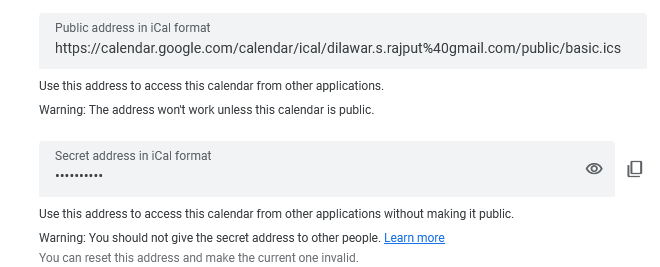
How to find an iCal url? Most calendar providers should have it enabled in settings. Here is a screenshot from google calendar.

2de437906848412483032ae49b804943 -- How to find ical url from your google calendar

You should use the private URL if you also want to see the title of the event.

On windows, you can add this tool to Task Schedular.

I can’t believe I am using Windows — things you do to make a living!