Tag Archives: tool

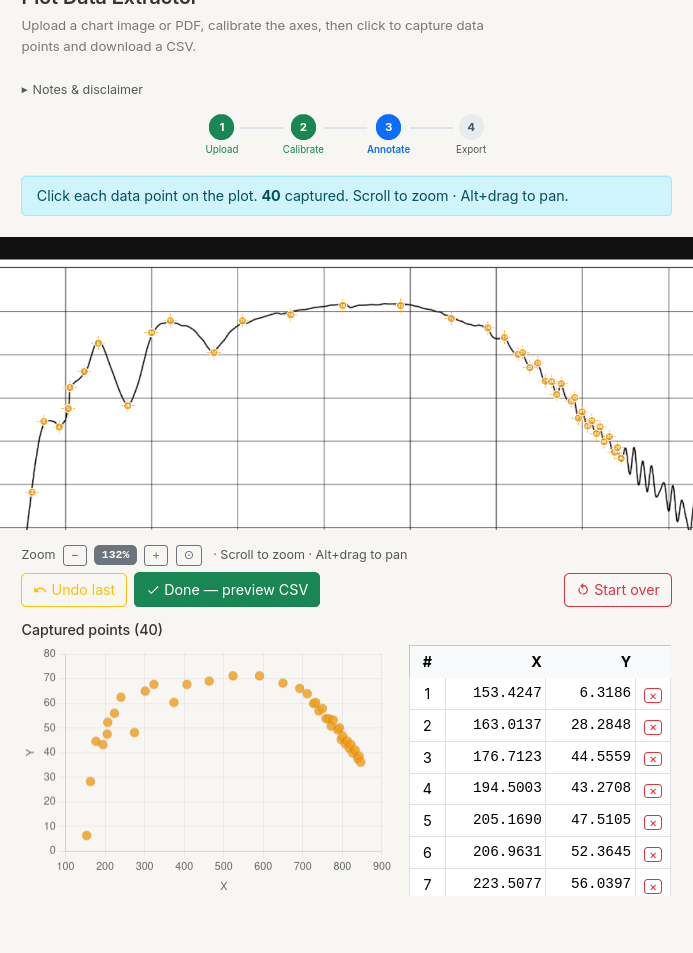
Web utility to digitize old plots

Today, I wrote a small web-utility to digitize old plots. You upload an image or pdf of a plot, and extract data by clicking points on the curve. It is available at https://tools.dilawars.me/tool/plot-extractor. Why do this manually when AI can do it for you? First, because I wanted to write an utility and AI doesn’t always do a better job than a person!

This utility is a web-companion to to a somewhat popular Python utility I wrote a few back to digitize plots in batch mode.

November 15, 2025: Weekly Notes 2025/22

Last week note November 8, 2025: Weekly Notes 2025/21

Stress testing my router to know max transfer speed over WiFi/LAN

https://www.speedtest.net/ is great tool for learning about your internet connection speed.

If you are in a local environment, how do you figure out available bandwidth? Use cases: copying large files from one internal machine to another internal machine? Or running a local streaming service.

You can usehttps://iperf.fr/. You need two machines capable or running iperf3.

To test WiFi speed, at least one of connected via Wi-Fi. Both can also be connected by WiFi (worst case). My recommendation is to test in both cases.

  • Install iperf3 on both machines A and B.
  • Run iperf3 -s on machine A or use iperf3 -s -D to keep it running as daemon. Handy if you plan to test periodically.
  • Run iperf3 -c <ip_of_A> on machine B.

Sample output

Here is sample output at my home when both devices are connected by WiFi.

On a machine with IP 191.168.1.142, I run iperf3 in server mode.

$ iperf3 -s -D

Then on second machine

$ iperf3 -c 192.168.1.142
Connecting to host 192.168.1.142, port 5201
[  5] local 192.168.1.131 port 38888 connected to 192.168.1.142 port 5201
[ ID] Interval           Transfer     Bitrate         Retr  Cwnd
[  5]   0.00-1.00   sec  12.8 MBytes   107 Mbits/sec    0    124 KBytes       
[  5]   1.00-2.00   sec  13.2 MBytes   111 Mbits/sec    0    124 KBytes       
[  5]   2.00-3.00   sec  13.1 MBytes   110 Mbits/sec    0    124 KBytes       
[  5]   3.00-4.00   sec  13.6 MBytes   114 Mbits/sec    0    124 KBytes       
[  5]   4.00-5.00   sec  13.0 MBytes   109 Mbits/sec    0    124 KBytes       
[  5]   5.00-6.00   sec  12.6 MBytes   106 Mbits/sec    0    124 KBytes       
[  5]   6.00-7.00   sec  11.2 MBytes  94.4 Mbits/sec    0    124 KBytes       
[  5]   7.00-8.00   sec  10.4 MBytes  87.0 Mbits/sec    0    124 KBytes       
[  5]   8.00-9.00   sec  13.0 MBytes   109 Mbits/sec    0    124 KBytes       
[  5]   9.00-10.00  sec  13.1 MBytes   110 Mbits/sec    0    124 KBytes       
- - - - - - - - - - - - - - - - - - - - - - - - -
[ ID] Interval           Transfer     Bitrate         Retr
[  5]   0.00-10.00  sec   126 MBytes   106 Mbits/sec    0            sender
[  5]   0.00-10.01  sec   126 MBytes   105 Mbits/sec                  receiver

iperf Done.

Here we go. I have some idea how fast I can transfer data between two computers on my local network.

self-hosted ntfy service with admin account

  • First, we need a script that setup admin account for us after starting the service. init.sh file that you should put inside ntfy/init.sh
    #!/bin/sh
    ntfy serve &
    sleep 2
    NTFY_PASSWORD=${NTFY_PASSWORD} ntfy user add --role=admin ${NTFY_USER}
    wait
    
  • Now the compose file compose.yaml or docker-compose.yaml file.
    services:
      ntfy:
        image: binwiederhier/ntfy
        container_name: ntfy
        entrypoint: [ "/bin/sh", "/var/lib/ntfy/init.sh" ]
        environment:
          - TZ=UTC    \# optional: set desired timezone
          - NTFY_BASE_URL=https://ntfy.dilawars.me
          - NTFY_AUTH_FILE=/var/lib/ntfy/auth.db
          - NTFY_CACHE_FILE=/var/lib/ntfy/cache.db
          - NTFY_AUTH_DEFAULT_ACCESS=deny-all
          - NTFY_ATTACHMENT_CACHE_DIR=/var/lib/ntfy/attachments
          - NTFY_ENABLE_LOGIN=true
          - NTFY_USER=admin
          - NTFY_PASSWORD=yoyodillusingh
        volumes:
          - /var/cache/ntfy:/var/cache/ntfy
          - /etc/ntfy:/etc/ntfy
          - ./ntfy/:/var/lib/ntfy
        ports:
          - 8001:80
        healthcheck: \# optional: remember to adapt the host:port to your environment
            test: ["CMD-SHELL", "wget -q --tries=1 http://localhost:80/v1/health -O - | grep -Eo '\"healthy\"\\s*:\\s*true' || exit 1"]
            interval: 60s
            timeout: 10s
            retries: 3
            start_period: 40s
        restart: unless-stopped