
Tag Archives: observability

Using `otelcol` (open-telemetry collector) to collect docker logs and send to a self-hosted signoz

Assuming that your self hosted signoz is at http://signoz.example.com:4317 (gRPC) or at http://signoz.example.com:4138 (json), following is a docker compose setup to scrape logs from docker and send them to a self-hosted signoz. Prefer grpc since it is very efficient when it comes to sending logs.

Using Logspout, a log forwarder

I am going to use gliderlabs/logspout. It collects logs from running containers (using docker.sock) and make them available via a tcp socket for otel-collector to read. One can also use fluentd etc. I found this to be a simpler solution for my needs.

Set up the tcp receiver in your otel-collector-config.yaml to listen for logs. I am going to use port 2255.

otel-collector.yaml
YAML
receivers:
tcplog:
listen_address: "0.0.0.0:2255"
processors:
batch:
send_batch_size: 512
exporters:
debug:
verbosity: detailed
otlp:
endpoint: http://signoz.example.com:4317
tls:
insecure: true
service:
pipelines:
logs:
receivers: [tcplog]
processors: [batch]
exporters: [otlp]
extensions: []

Run the Log Forwarder

In the following docker compose file, a service logspout collects logs from docker containers and make them available on port 2255. We then use the above otel configuration files to read logs from the port 2255 and send it to self-hosted signoz.

compose.yaml
YAML
services:
logspout:
image: docker.io/gliderlabs/logspout
volumes:
- /etc/hostname:/etc/host_hostname:ro
- /var/run/docker.sock:/var/run/docker.sock
networks:
- otel
depends_on:
- otel-collector
command:
tcp://otel-collector:2255
otel-collector:
image: docker.io/otel/opentelemetry-collector-contrib
restart: unless-stopped
volumes:
- ./otel-config.yaml:/etc/otelcol-contrib/config.yaml
networks:
- otel
ports:
- 4317:4317 # OTLP gRPC receiver
- 4318:4318 # OTLP http receiver
- 2255:2255
networks:
otel:
driver: bridge

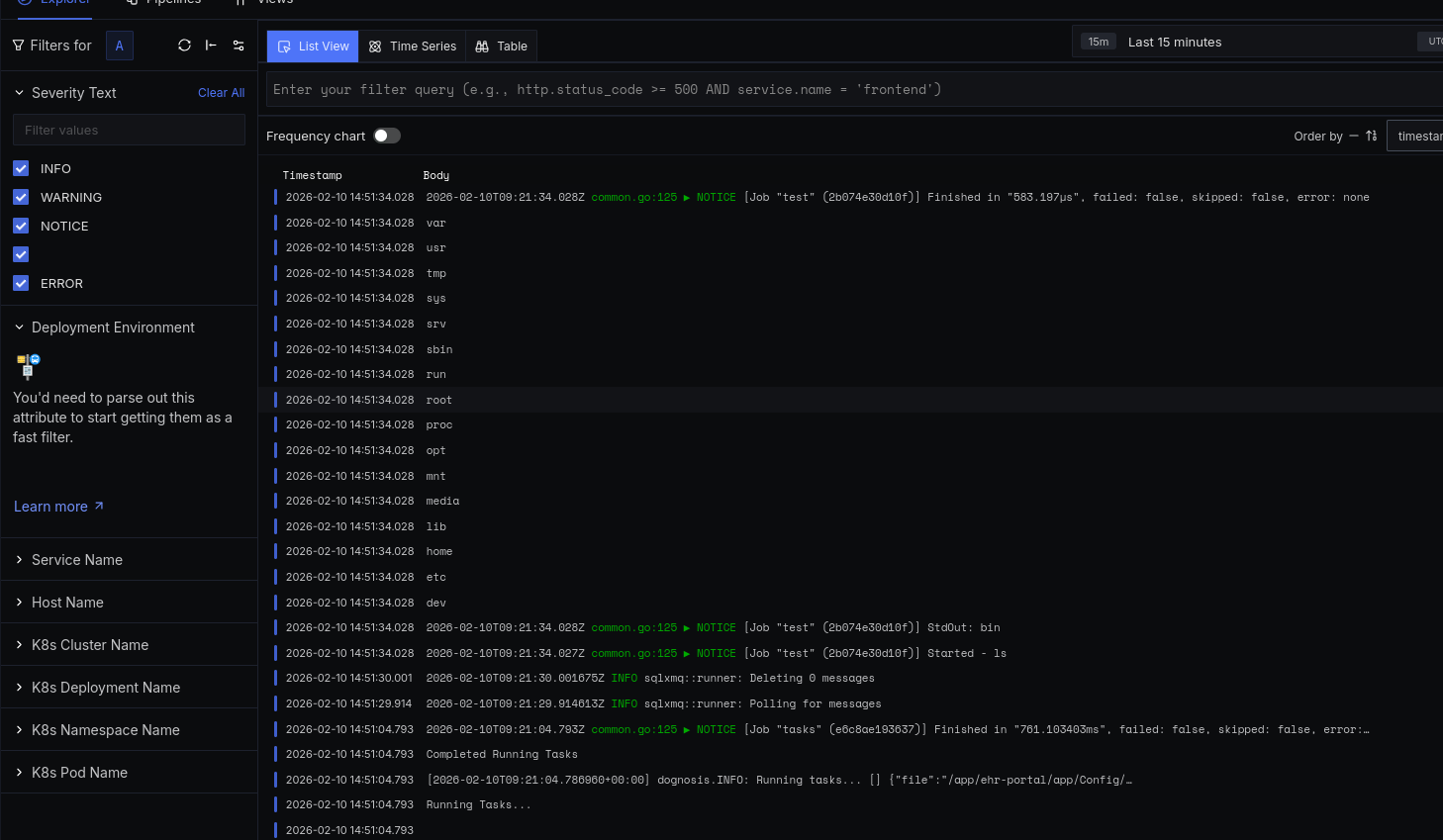
That’s it. Here is screenshot of collected logs.

Logs inside self-hosted signoz


Using monolog with codeigniter4

The standard logger in codeigniter4 is fine but its no monolog!

To use monolog codeigniter4, add the following to your app/Config/Service.php file. You can read more about supported handlers and formatters in monolog documentation. See https://github.com/Seldaek/monolog/blob/main/doc/02-handlers-formatters-processors.md#formatters. and there are many third party handlers and formatters available.

  • Note that I am logging to syslog rather than to a file (this won’t work on Windows). I think logging to syslog is better if you already have a scrapper running. And also, correlating with web-server logs is bit easier. Perhaps I am mistaken.
  • I am using a third party formatter http://github.com/bramus/monolog-colored-line-formatter to add colors to console logger. I think colors are a good idea if you need to scroll and look at the logs while developing.
<?php

// app/Config/Services.php 

use Bramus\Monolog\Formatter\ColoredLineFormatter;
use Monolog\Formatter\LineFormatter;
use Monolog\Handler\BrowserConsoleHandler;
use Monolog\Handler\StreamHandler;
use Monolog\Handler\SyslogHandler;
use Monolog\Logger;

class Services Extends BaseService 
{
    // Other services are not shown.

    /**
     * Use monolog logger.
     *
     * - Logs to syslogs
     * - Logs to console (colored)
     * - Logs to browser console (development only).
     */
    public static function logger(bool $getShared = true): Logger
    {
        if ($getShared) {
            return static::getSharedInstance('logger');
        }

        $logger = new Logger('my-portal');
        $consoleHandler = new StreamHandler('php://stdout', \Monolog\Level::Info);
        $consoleHandler->setFormatter(new ColoredLineFormatter());
        $logger->pushHandler($consoleHandler);

        // Also log to syslog
        $facilityName = "local6"; // See list here https://en.wikipedia.org/wiki/Syslog#Facility_levels
        $sysLogHandler = new SyslogHandler('my-portal', $facilityName);
        $formatter = new LineFormatter("%channel%.%level_name%: %message% %extra%");
        $sysLogHandler->setFormatter($formatter);
        $logger->pushHandler($sysLogHandler);

        if(ENVIRONMENT === "development") {
            $logger->pushHandler(new BrowserConsoleHandler());
        }

        return $logger;
    }
}

Continue to use your log_message function as before, and perhaps comment out all but one handlers in app/Config/Logger.php file.

I think once service with alias logger is added, most handlers in file app/Config/Logger.php stops working by themselves.